How to keep AI coding agents away from your production keys
If you’re like me, you’ve likely vibecoded some apps this year. The recent uptick in cyberattacks got me worried about my exposure. So I spent the last week or two hardening every Internet property I own.
One of the highest-leverage things I did was to clean up how I store sensitive info like API tokens, and how I share them with my agents. I’ve read one too many horror stories on X about people waking up to a $50k Anthropic bill because someone stole their key.
This kind of work is painfully boring, but also incredibly important — and fortunately, your agent can drive a lot of it for you.
Want to secure your stack without reading all this? Share this link with your coding agent: https://collider.so/guides/secure-your-stack.md — it walks the agent through the same steps and checklist, asks you before anything irreversible, and never touches a secret value.
In this post, I share how I designed my agent-ready secrets management system, and what I learned along the way.
This is for you if you build with AI coding agents — Claude Code, Cursor, Codex, Gemini CLI — and you have more than one app with API keys. If those keys sit in .env files or one shared vault, and your agent can read them, then so can anything that tricks your agent.
What you get from this guide: a setup where
- an agent can read your dev keys, but can’t see a single production value — and the tool enforces it, not a line in your prompt
- one leaked key can only hurt one app, and only up to a spending cap
- every secret lives in one place and flows out to Cloudflare, Vercel or wherever your apps run, on its own
I did this across seven apps last week. Below is the exact stack, the five steps, and a checklist.
Why now
Attackers have noticed where the keys are: on developers’ machines, and in reach of their agents. A few from the past year or so:
- LiteLLM, October 2026. The popular library for calling AI models had its release pipeline compromised, for the second time this year. The poisoned version went after cloud credentials, SSH keys, and the login files for Claude, Codex, Gemini and Cursor. (Help Net Security)
- “Comment and Control”, April 2026. Researchers showed that one malicious pull-request title could get Claude Code’s security-review action, Gemini CLI’s action and GitHub’s Copilot agent to post their own API keys as PR comments. (VentureBeat)
- Nx “s1ngularity”, August 2025. A poisoned npm release ran Claude Code, Gemini CLI and Amazon Q on victims’ machines with their safety prompts switched off, and told them to hunt for
.envfiles, keys and wallets. What they found went up to public GitHub repos. (Snyk) - Shai-Hulud, September 2025. A self-spreading npm worm hit at least 187 packages, scanned developer machines for tokens, and published what it found. (Krebs on Security)
- MCP configs. GitGuardian counted 24,008 secrets in MCP configuration files on public GitHub, 2,117 of them still valid. They also found Claude Code-assisted commits leaking secrets at about twice the baseline rate. (GitGuardian)
None of these needed a clever exploit against your app. They needed your keys to be readable by whatever was running on your machine.
Before and after
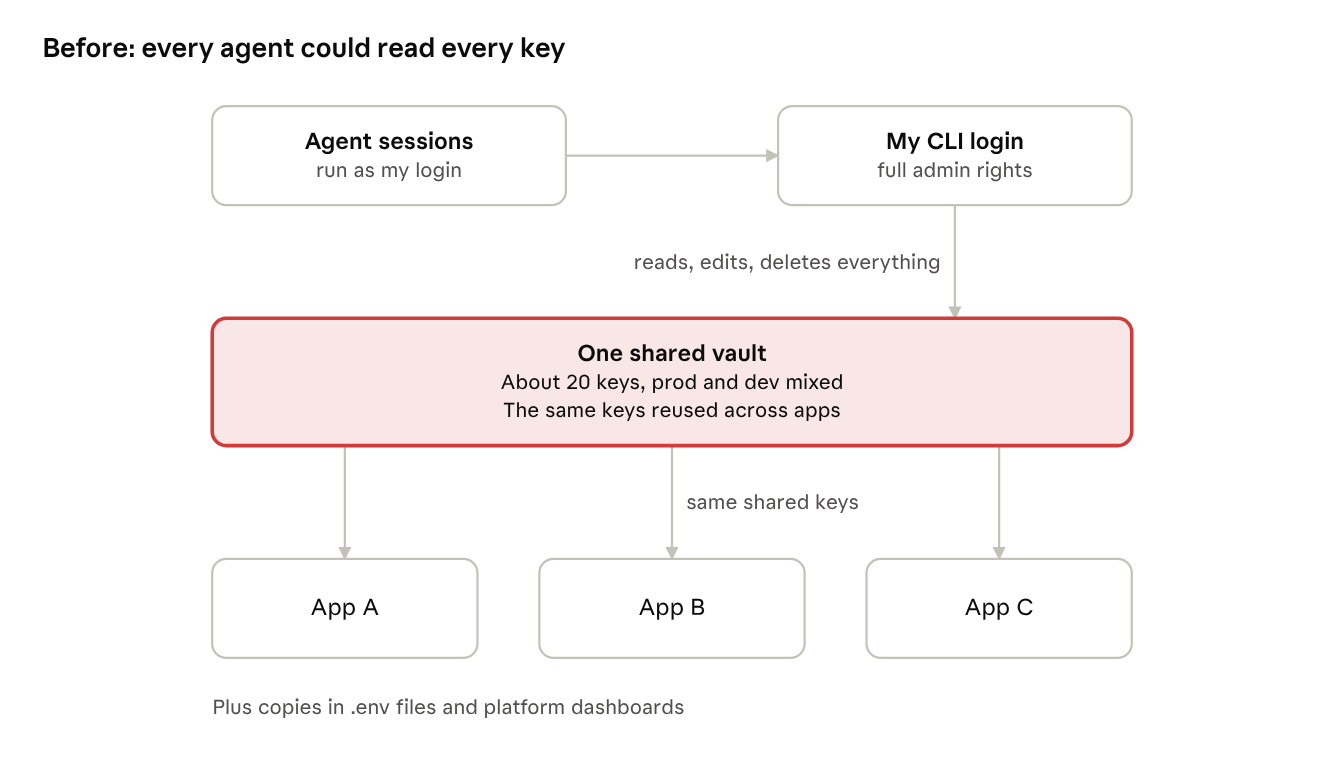
Before: agents ran under my admin login, so they could read, edit and delete every key in one shared vault.
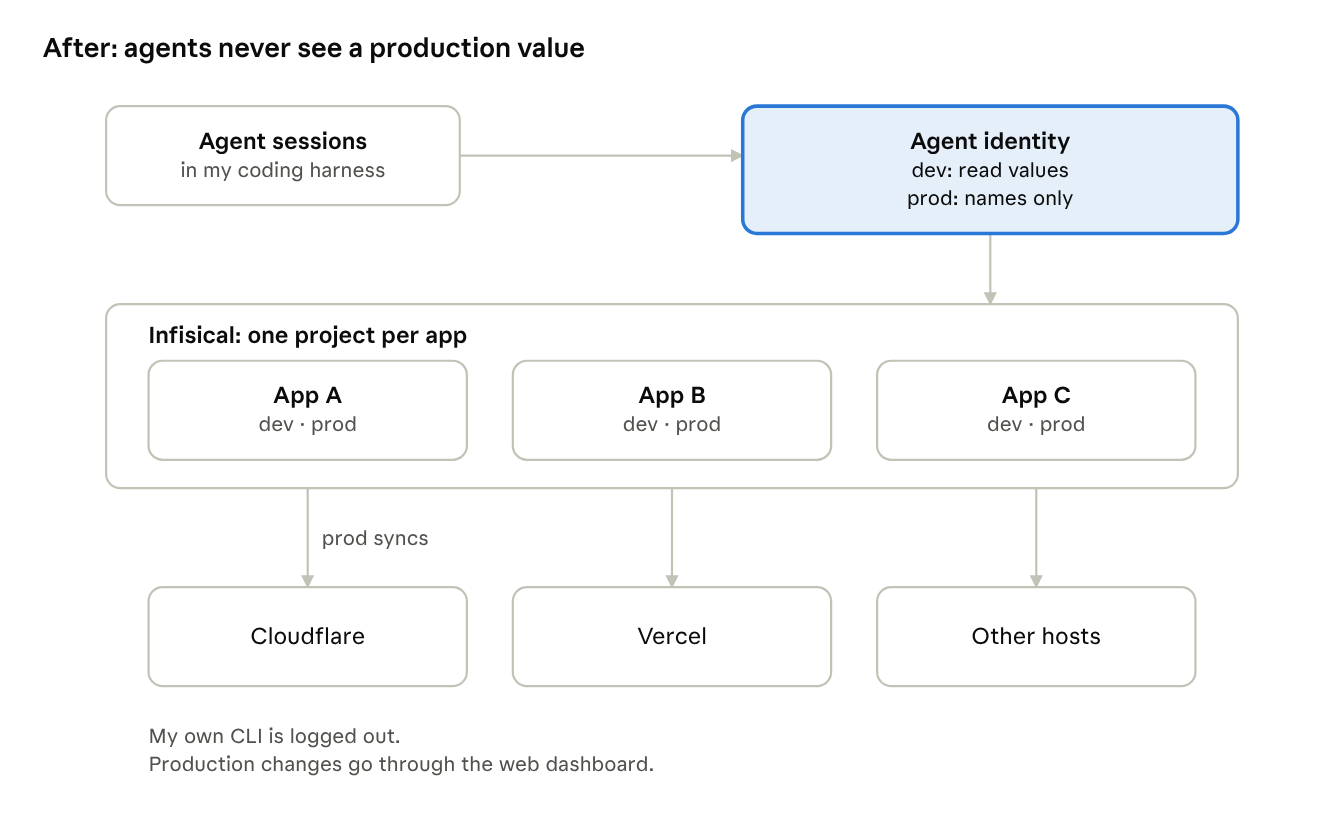
After: agents have their own identity that reads dev values and sees prod names only. Each app’s production secrets flow straight to where it runs.
My stack
| Infisical (Pro plan) | The one place secrets live. A project per app, syncs out to each platform, and a separate login for agents. It's some of the best money I spend all year. |
| Cloudflare Workers and Pages | Where most of my apps run. Infisical pushes secrets straight in. |
| Vercel | Hosts one app. Infisical syncs its production values. |
| AI model provider consoles | A workspace or project per app, each with a monthly spending cap. |
| Coding harness | Where my agents run. A session-start hook logs them in as the agent identity, and they ask before sending, sharing or deleting. |
| macOS Keychain | Holds each machine's agent credential. |
I chose Infisical for this, and I love it (not a paid endorsement!). If you’d rather use something else, Doppler does most of what’s below: a project per app with environments, read-only tokens scoped to one environment, and a native Vercel sync. Its Cloudflare Workers support is a command-line pipe rather than an automatic sync. Password managers with secrets features, like 1Password and Bitwarden, can hold the keys, but I didn’t find native syncs to Vercel or Cloudflare, so you’d write more glue yourself.
Step 1: One secrets project per app, synced to where it runs
Give each app its own Infisical project with two environments, dev and prod. Then set up a secret sync from prod to the platform the app runs on. Infisical has syncs for Cloudflare Workers and Pages, Vercel and plenty more.
From then on there’s one rule: change a secret only in Infisical. Never wrangler secret put or vercel env add for production. The sync carries every change out.
What I’d do the same again:
- Start with the smallest app. My pilot had exactly one secret. Run the app’s smoke test before moving to the next.
- Turn on “prevent secret deletion” for every new sync. A typo in Infisical then can’t wipe a live secret on the platform. Once the platform holds exactly the same names as Infisical, switch it off, so Infisical becomes the full record.
- Prefer syncs over runtime fetching. One of my apps used to log in to Infisical at boot with its own machine credential. With a sync, values arrive as plain environment variables, and that credential goes away.
Step 2: One key per app and environment, with caps and an expiry
The rule: no provider key is shared between apps, and dev and prod get separate keys too. If one leaks, you revoke one key and one app notices.
- Name keys so you can read them at the provider:
appname-prod-202611. You can see whose it is and when it was made, without opening anything. - Keep the variable name standard. The app reads
ANTHROPIC_API_KEY, notANTHROPIC_API_KEY_APPNAME. The project already says which app it belongs to. - Cap the spend. In your AI model provider’s console, give each app its own workspace or project, with a monthly limit where the provider supports one. A leaked key, or an agent stuck in a loop, hits that app’s cap — not your whole account.
- Scope it down. Email keys that can only send, from one domain. Storage tokens for one bucket. Deploy tokens for one app.
- Give every key an expiry, a year at most, and put a reminder in your task list a month before.
Step 3: Find what was exposed, rotate it, revoke the rest
If your agents could read your old setup, assume everything in it was exposed. But rotating every key blindly is a lot of work, so sort them first.
I wrote a small script that took each old value and checked two things: does the provider still accept it, and does the same value show up anywhere else. It printed statuses only, never the values. That split my old keys into three piles:
- Already dead: about a quarter of them. Nothing to do.
- Dev keys that had moved to their new project: low risk, since agents are meant to read dev anyway.
- Production secrets sitting somewhere agents could read: rotate these first. I found an email password and a webhook signing secret. The webhook one was sneaky: with it, someone could fake “this address bounced” events and quietly stop an app emailing its own users.
Then revoke the old keys at each provider, but only after the replacement has been running for a while. Where a provider lets you disable before deleting, do that first — it’s the undo button.
Step 4: Give your agents their own login
This is the step that matters most. If your agent runs under your login, it has your permissions — all of them. Give it a weaker identity of its own:
- Create a machine identity in Infisical (Universal Auth) with no organization permissions.
- Add it to each project with the “No Access” role, then grant folder access:
dev= Read,prod= List. List shows names, never values. - Give each machine its own client secret, stored in the macOS Keychain. Lose a laptop, revoke that one secret; the others keep working.
- Log the agent in at session start. A session-start hook in my coding harness trades the machine’s client secret for a token valid for one day, and exports it as
INFISICAL_TOKENfor the session. - Log yourself out:
infisical logout. For production work, use the web dashboard, or log in, do the one job, and log out. - Test it. Reading
devworks. Readingprodvalues is refused. Writing anywhere is refused.
Why names-only for prod? Most of what I ask agents to check is “does this platform hold the same secrets as Infisical?” They can still answer that without ever seeing a production value.
The difference from before is where the rule lives. “Agents only read dev” used to be a sentence in a markdown file. Now Infisical refuses the request.
Step 5: Close the other doors
Secrets managers aren’t the only place agents find credentials. Three more I tightened:
- MCP servers: use OAuth, not a token in a config file. One of mine authenticated with a long-lived token sitting in my coding harness’s config file. It now signs in with OAuth, and I rotated the old token. (Remember GitGuardian’s 24,008 secrets in MCP configs.)
- claude.ai connectors: use “Always ask”, not “Needs approval”. “Needs approval” can still let Claude act without asking in auto mode. I set send, forward and reply to Blocked on my business mailboxes and Always ask on my personal one, plus Always ask for Slack sends and Drive sharing and trashing.
- Coding harness permissions: an
askrule for every tool that sends, shares or deletes. I also removed the blanket “always allow curl” and narrowed a “deploy to prod without asking” rule to my main checkout only.
What I deliberately kept: my agents still drive the Cloudflare and Vercel dashboards for me. That’s most of why they’re useful, and I wasn’t willing to give it up.
Checklist
- ☐ One Infisical project per app, with
devandprod - ☐ A sync from
prodto each platform, with “prevent secret deletion” on until names match - ☐ No
wrangler secret put/vercel env addfor production, ever again - ☐ One key per app per environment, named
app-env-yyyymm, scoped down, expiring within a year, with a reminder before it does - ☐ A spending cap per app on your AI provider
- ☐ Old keys checked, exposed prod secrets rotated, the rest revoked (disable first where you can)
- ☐ A machine identity for agents:
devRead,prodList, nothing else - ☐ One client secret per machine, in the Keychain
- ☐ Agent sessions log in as that identity; your own CLI is logged out
- ☐ MCP servers on OAuth; no tokens in config files
- ☐ Connector and agent permissions set to “Always ask” for send, share and delete
What this doesn’t cover
Doing all this doesn’t guarantee security, and it’s worth being clear where it stops.
- Dev keys are still readable by agents. That’s on purpose, so keep them cheap to lose: separate from prod, with low caps. If an app has only one database, its dev key may still be more powerful than you’d like. A separate dev database is the real fix.
- Your platform logins are still your agents’ logins. If an agent can drive your Cloudflare or Vercel account, it can reach production that way. This guide closes the single place that held every secret for every app. It doesn’t close every road.
- The next step is agents never holding keys at all. Infisical has an early proxy feature that adds the key to each request, so the process never sees it. I haven’t tried it yet.
Over to you
That’s my setup as of this week. It isn’t perfect, and I expect it to change: the tools are moving fast, and so are the people trying to break them.
If you’d rather skip the reading, hand your agent the guide and let it walk you through it.
And if you’ve found a better way to do any of this, spotted something I got wrong, or use a tool I should know about, I’d love to hear it. Get in touch. If it changes how I do this, I’ll update the post.
Sources
- LiteLLM hit by second supply chain attack this year, Help Net Security, Oct 22, 2026
- Three AI coding agents leaked secrets through a single prompt injection, VentureBeat, Apr 21, 2026
- Weaponizing AI coding agents for malware in the Nx malicious package, Snyk, Aug 27, 2025
- Self-replicating worm hits 180+ software packages, Krebs on Security, Sep 16, 2025
- The state of secrets sprawl 2026, GitGuardian, Mar 17, 2026
Subscribe for new essays